ESP32 sensor dashboard#
A DHT22 on an ESP32, in the greenhouse at the bottom of the garden. We want the temperature on our phone from anywhere, with no Raspberry Pi in between, no MQTT broker, and no port forwarding on the house router. The board serves the page itself, at its own HTTPS address.
Bill of materials#
| Part | Notes |
|---|---|
| ESP32 dev board | Any classic ESP32 (ESP32-DevKitC, WROOM-32). S2, S3 and C3 work too |
| DHT22 (AM2302) | The 3-pin module has its pull-up on board |
| 10 kΩ resistor | Only for a bare 4-pin DHT22 |
| Jumper wires, USB cable |
Software: VS Code with the PlatformIO extension, and a free Tollan account.
How it works#
  phone ──HTTPS──▶ greenhouse-byrne.a.tollan.app
                                 ▲
                                 │ the board connects out
  ESP32 ─────────────────────────┘
    your sketch answers each visit
The TollanAgent library connects the board out to Tollan and keeps the connection open. Each visit reaches your sketch as an HTTP request, and whatever the sketch sends back goes to the visitor. Tollan handles the HTTPS certificate, so the board never deals with one.
Step 1: Wire it up#
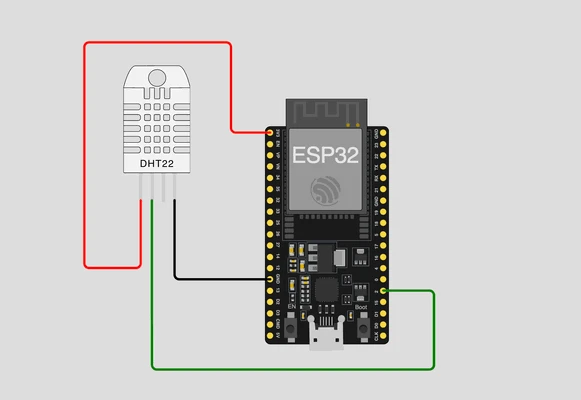
| DHT22 | ESP32 |
|---|---|
| VCC (+) | 3V3 |
| DATA (out) | GPIO 2 |
| GND (−) | GND |
On a bare 4-pin DHT22, pin 1 is VCC, pin 2 is DATA and pin 4 is GND, and you add the 10 kΩ resistor between DATA and 3V3.
Step 2: Get the demo project#
In the console, add a device named greenhouse with the ESP32 architecture. On its install step, click Download demo project. You get a complete PlatformIO project for this board: the library, the board's src/tollan_config.h and a starter sketch.
Important
The link works once and expires after 15 minutes, and the token inside enrolls exactly one board. Until the board has enrolled, keep tollan_config.h out of git and shared drives.
Open the folder in VS Code. In platformio.ini, add the sensor libraries under lib_deps:
lib_deps =
  tollan-agent
  adafruit/DHT sensor library@^1.4.6
  adafruit/Adafruit Unified Sensor@^1.1.14
Step 3: The sketch#
Replace src/main.cpp with this and fill in your Wi-Fi details at the top (2.4 GHz only: the ESP32 has no 5 GHz radio).
// Greenhouse: an ESP32 + DHT22 serving a live page at its own HTTPS address.
#include <WiFi.h>
#include <DHT.h>
#include <TollanAgent.h>
#include "tollan_config.h" // from the console's demo project
using namespace tollan;
static const char* WIFI_SSID = "your-wifi";
static const char* WIFI_PASS = "your-wifi-password";
DHT dht(2, DHT22); // data pin on GPIO 2
TollanAgent agent;
float tempC = NAN, humidity = NAN;
static const char PAGE[] = R"HTML(<!doctype html>
<meta name="viewport" content="width=device-width,initial-scale=1">
<title>Greenhouse</title>
<style>body{font:20px system-ui;text-align:center;margin-top:20vh}b{font-size:3em}</style>
<p><b id="t">--</b> °C<br><span id="h">--</span> % humidity</p>
<script>
async function tick() {
const d = await (await fetch('/api')).json();
t.textContent = d.tempC ?? '--';
h.textContent = d.humidity ?? '--';
}
tick(); setInterval(tick, 5000);
</script>
)HTML";
// Send one complete HTTP response on a channel, then close it.
static void reply(uint32_t ch, const char* status, const char* type, const char* body, size_t len) {
char head[160];
int n = snprintf(head, sizeof(head),
"HTTP/1.1 %s\r\nContent-Type: %s\r\nContent-Length: %u\r\n"
"Connection: close\r\n\r\n",
status, type, (unsigned)len);
agent.send(ch, (const uint8_t*)head, n);
for (size_t off = 0; off < len; off += 1024) { // send in 1 KB pieces
agent.send(ch, (const uint8_t*)body + off, len - off < 1024 ? len - off : 1024);
}
agent.closeChannel(ch);
}
void setup() {
Serial.begin(115200);
dht.begin();
WiFi.mode(WIFI_STA);
WiFi.begin(WIFI_SSID, WIFI_PASS);
while (WiFi.status() != WL_CONNECTED) delay(300);
agent.log().printf("wifi ok, ip=%s\n", WiFi.localIP().toString().c_str());
TollanConfig cfg;
cfg.host = TOLLAN_RELAY_HOST;
cfg.port = TOLLAN_RELAY_PORT;
cfg.caCert = CA_CERT;
#ifdef TOLLAN_ENROLL_TOKEN
cfg.enrollUrl = TOLLAN_ENROLL_URL; // first boot: the board makes its key and enrolls
cfg.enrollToken = TOLLAN_ENROLL_TOKEN;
cfg.enrollCaCert = TOLLAN_ENROLL_CA;
#else
cfg.clientCert = DEVICE_CERT;
cfg.clientKey = DEVICE_KEY;
#endif
cfg.renewUrl = TOLLAN_RENEW_URL;
cfg.deviceId = TOLLAN_DEVICE_ID; // health check-in for the console
cfg.targetsUrl = TOLLAN_TARGETS_URL;
// Every visit arrives here as an HTTP request. A GET fits in the first chunk, so we
// answer on it; a server taking POST bodies would buffer until the headers end.
agent.onData([](uint32_t ch, const uint8_t* data, size_t len) {
const char* req = (const char*)data;
if (len >= 8 && memcmp(req, "GET /api", 8) == 0) {
char json[64];
int n = isnan(tempC)
? snprintf(json, sizeof(json), "{\"tempC\":null,\"humidity\":null}")
: snprintf(json, sizeof(json), "{\"tempC\":%.1f,\"humidity\":%.0f}", tempC, humidity);
reply(ch, "200 OK", "application/json", json, n);
} else if (len >= 6 && memcmp(req, "GET / ", 6) == 0) {
reply(ch, "200 OK", "text/html; charset=utf-8", PAGE, sizeof(PAGE) - 1);
} else {
reply(ch, "404 Not Found", "text/plain", "not found\n", 10);
}
});
agent.begin(cfg);
}
void loop() {
agent.loop();
// The DHT22 needs 2 s between reads. Never delay() here: loop() must keep
// calling agent.loop() or the board drops off.
static uint32_t lastRead = 0;
if (millis() - lastRead >= 2000) {
lastRead = millis();
float t = dht.readTemperature(), h = dht.readHumidity();
if (isnan(t) || isnan(h)) {
agent.log().println("DHT22 read failed: check the wiring and pull-up");
} else {
tempC = t;
humidity = h;
}
}
delay(2);
}Three things worth noticing:
- The board is the web server.
onDatagets the visitor's HTTP request. We match the first line and send back a complete HTTP response: the page at/, JSON at/api, a 404 for anything else. - The page polls
/apievery 5 seconds, so the reading updates without reloading. loop()never blocks. The DHT22 is read every 2 seconds on a timer, not withdelay(2000), becauseagent.loop()has to keep running to keep the board connected.
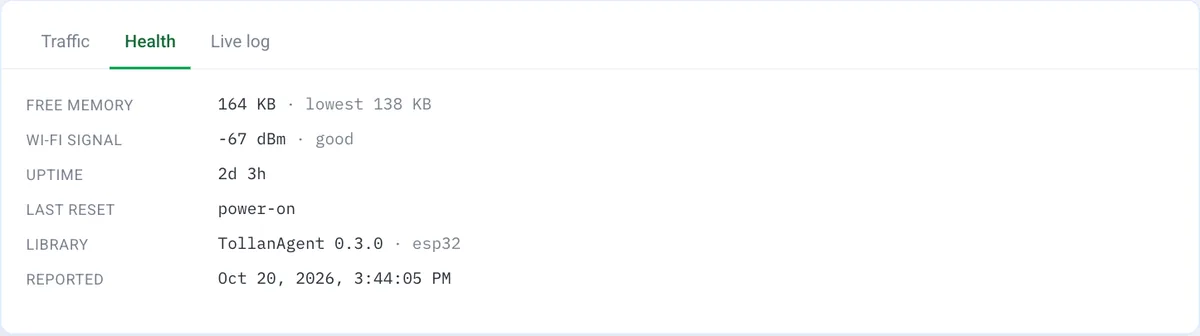
Plug the board in and click Upload, then open the Serial Monitor at 115200 baud. After wifi ok the board syncs its clock, enrolls on first boot, and connects; the device turns online in the console. A few minutes later its first check-in fills the Health tab:
Step 4: Give it an address#
On the device page, click Add route:
| Field | Value |
|---|---|
| Internal host | 127.0.0.1 |
| Internal port | 80 |
| Exposure | sni |
The board answers every request itself, so the internal target is only a placeholder. The dialog previews the address, something like greenhouse-byrne.a.tollan.app. Save it.
Step 5: Check it from anywhere#
curl https://greenhouse-byrne.a.tollan.app/api
{"tempC":21.4,"humidity":56}
Then open the address on your phone. On the free plan the first visit shows a short Tollan notice; tap Continue and the dashboard loads. The 5-second updates are fetch calls, which never see the notice.
Gotchas#
DHT22 read failedin the log almost always means a missing pull-up or the wrong pin. The page shows--until a read succeeds.- Upload fails with "Wrong boot mode detected"? GPIO 2 also decides how the ESP32 boots, and the sensor's pull-up can hold it high while you flash. Unplug the data wire during the upload, or move it to GPIO 4 and change the
2inDHT dht(2, DHT22). - No Serial cable in the greenhouse? Anything printed with
agent.log()also shows up under Live log on the device page in the console, and the Health panel shows memory, Wi-Fi signal and uptime from the board's check-ins. - Stuck before connecting? The board needs the right time before it can connect. See TLS, clock & troubleshooting.
- Re-flashing is fine. The board keeps its identity in flash, so uploading a new sketch doesn't need a new download. A new board does, and so does a full flash erase.
Where to take it next#
- Add a password before you share the link: Password-protect a site.
- Switch a pump or a fan from the page: match
GET /pump/oninonDataand drive a GPIO. Put a password on it first. - The full library surface is in the ESP32 API reference.